Secure SMB File Sharing over WireGuard (VPN).
An end-to-end security implementation.
A practical case study showing how an SMB share can appear “configured” yet fail in real conditions (VPN path, Windows policies, Samba auth, and Linux filesystem authorization) — and how it was fixed using evidence, not guesswork.
What looked “fixed”… wasn’t !
How it was solved
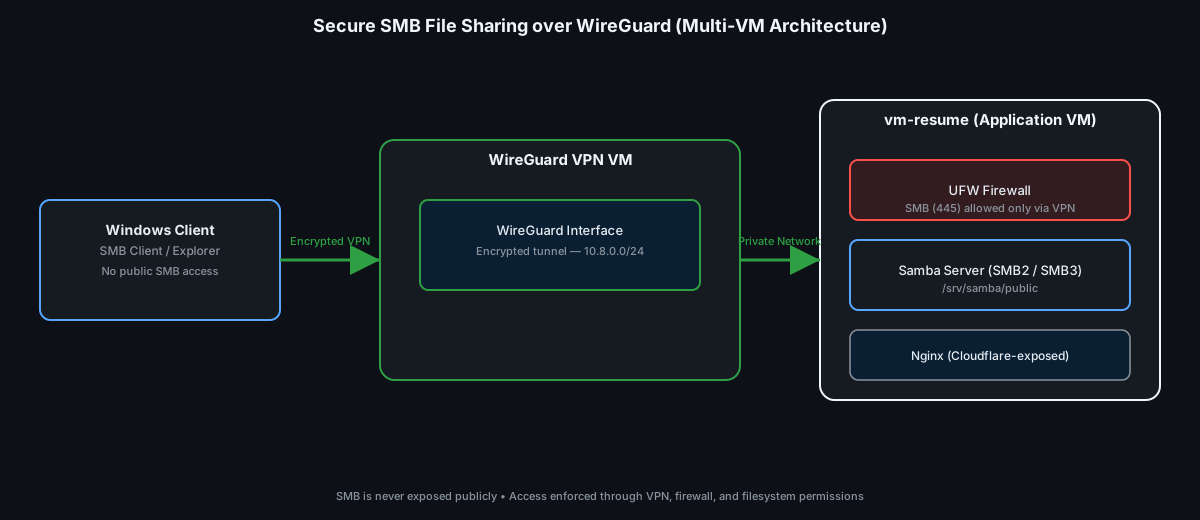
Architecture that makes the boundary obvious
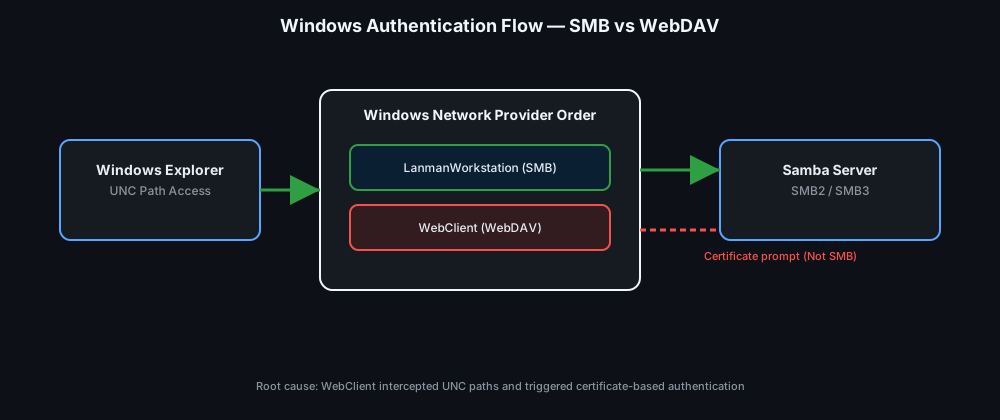
Authentication flow — when “login succeeded” still means “access denied”
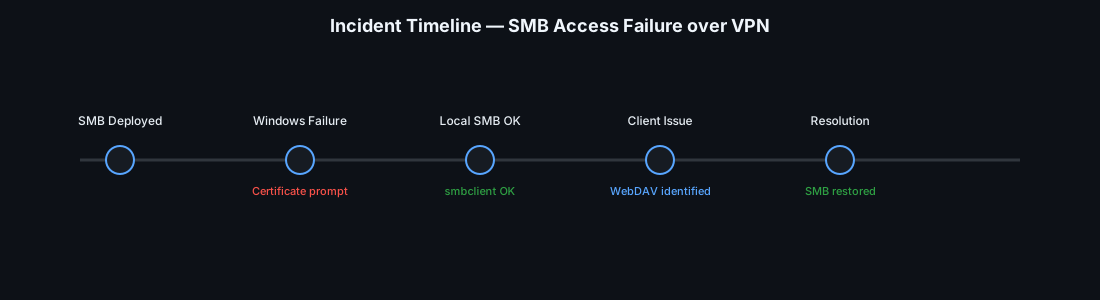
Incident timeline — the moment the “certificate issue” stopped making sense
Permission model — Where “access” actually gets decided.
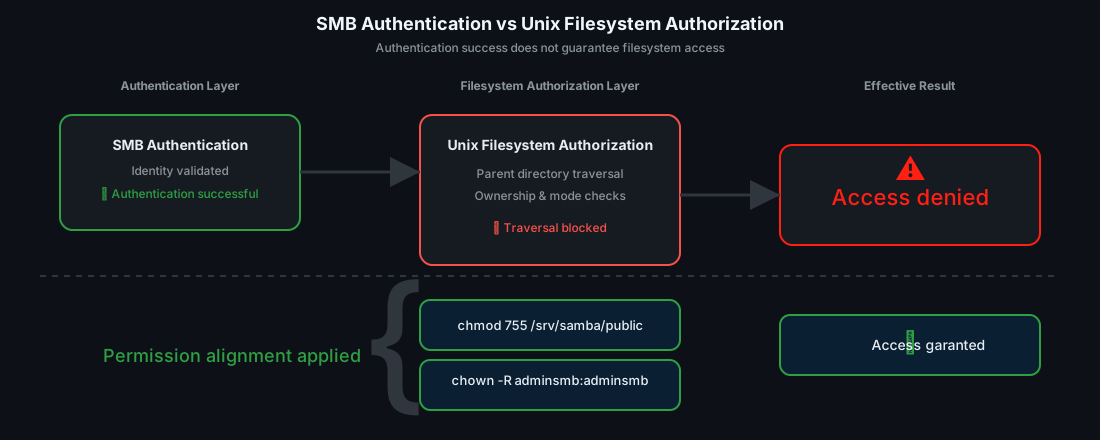
700 on
/srv/samba stops everything —
the share can exist, auth can pass, and still never reach
/srv/samba/public.
chown +
chmod (end-to-end, not just the folder).
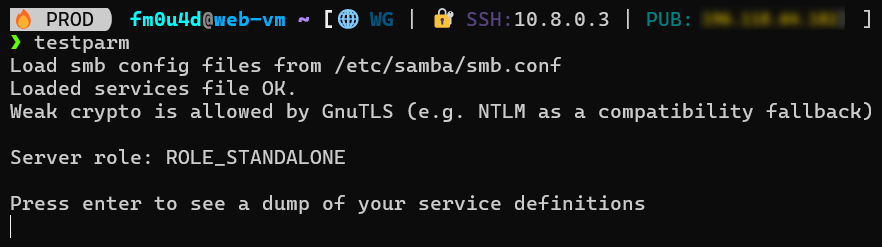
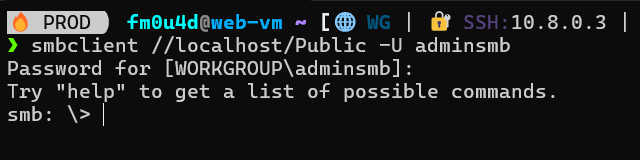
Only what matters: mapping success, server state checks, and Explorer access.
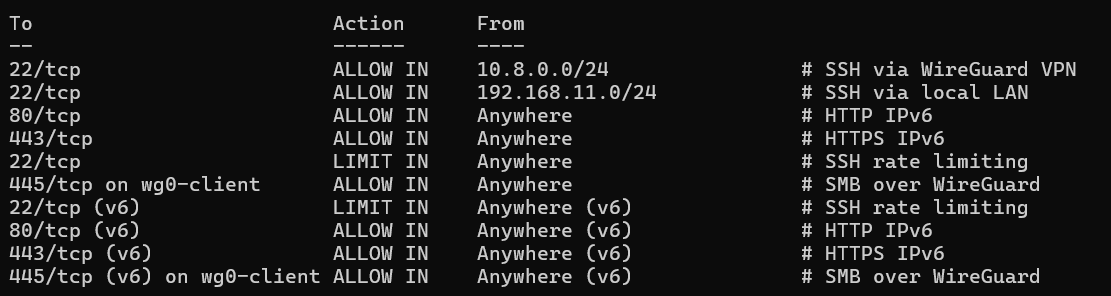
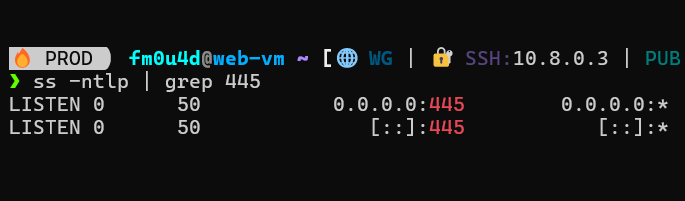
No “pretty” screenshots — just hard evidence. A mapped drive that authenticates, Explorer behavior that reveals post-auth failures, and server-side validation (share config + port state) to eliminate guesswork.
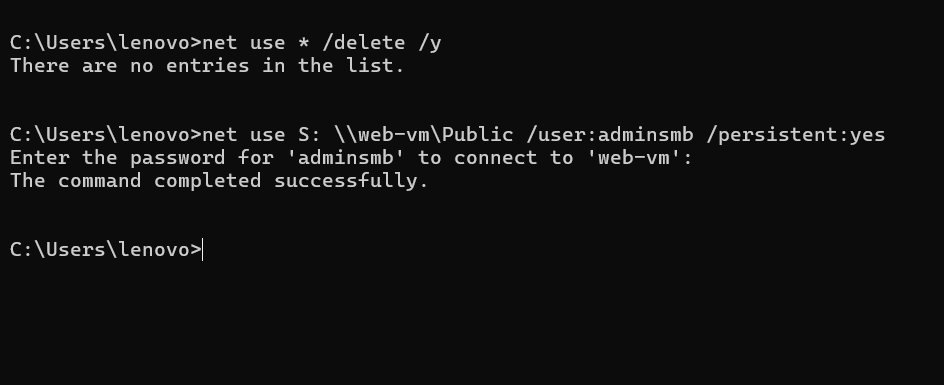
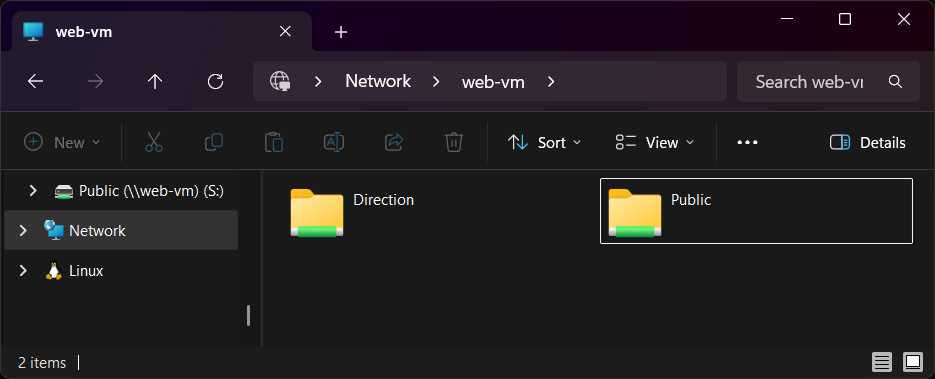
Solution playbook — make the noise disappear, then fix the gate.
One incident, two blockers — Windows policy noise first, Linux permission gate second.
This is the exact “how-to-fix” path if you ever hit the same deceptive SMB failure over VPN: silence the certificate trap, enforce a clean SMB client policy, then align the filesystem permission chain.
# PowerShell (Run as Administrator)

# 1) Silence the certificate prompt source (WebDAV redirector)
Get-Service WebClient
Stop-Service WebClient -Force
Set-Service WebClient -StartupType Disabled

# (Optional) confirm provider order (WebClient should NOT be preferred)
reg query "HKLM\SYSTEM\CurrentControlSet\Control\NetworkProvider\Order" /v ProviderOrder

# 2) Force predictable SMB client behavior (SMB2/SMB3 only)
# Ensure SMB1 client is disabled
Disable-WindowsOptionalFeature -Online -FeatureName SMB1Protocol -NoRestart

# Verify SMB client configuration
Get-SmbClientConfiguration | Select EnableSMB1Protocol, EnableSMB2Protocol, RequireSecuritySignature, EnableSecuritySignature

# 3) Clean stale sessions / credentials (prevents phantom logons)
net use * /delete /y
cmdkey /list
# (Remove only the relevant one if it exists)
# cmdkey /delete:TERMSRV/web-vm
# cmdkey /delete:web-vm

# 4) Reconnect (use hostname for your story consistency)
net use Z: \\web-vm\Public /user:adminsmb /persistent:yes
# On the SMB server (vm-resume)

# 0) Inspect current permissions (this is where your story started)
sudo ls -la /srv/samba
sudo namei -l /srv/samba/public
sudo namei -l /srv/samba/direction

# 1) Make the parent path traversable (execute bit on directories)
# Keep it minimal: allow traversal without opening everything.
sudo chmod 755 /srv
sudo chmod 755 /srv/samba

# 2) Align ownership to the SMB user model (adminsmb)
sudo chown -R adminsmb:adminsmb /srv/samba/public
sudo chown -R adminsmb:adminsmb /srv/samba/direction

# 3) Set sane directory permissions (POC defaults)
# Directories: allow traverse + read, and controlled write
sudo find /srv/samba/public -type d -exec chmod 775 {} \;
sudo find /srv/samba/public -type f -exec chmod 664 {} \;

sudo find /srv/samba/direction -type d -exec chmod 775 {} \;
sudo find /srv/samba/direction -type f -exec chmod 664 {} \;

# 4) Validate Samba config and service state
sudo testparm -s
sudo ss -lntp | grep 445

# 5) Local functional test (removes Windows + VPN from the equation)
smbclient //127.0.0.1/Public -U adminsmb -c "ls"
smbclient //127.0.0.1/Direction -U adminsmb -c "ls"
Reproduce quickly — a portable lab with deterministic validation.
# 1) On the SMB VM (vm-resume)
sudo apt update
sudo apt install -y samba smbclient ufw

# 2) Apply sanitized config + restart
sudo cp ./server/smb.conf.sanitized /etc/samba/smb.conf
sudo testparm -s
sudo systemctl restart smbd nmbd
sudo ss -lntp | grep ':445'

# 3) Create share paths + enforce ownership/permissions
sudo mkdir -p /srv/samba/public /srv/samba/direction
sudo chown -R adminsmb:adminsmb /srv/samba/public /srv/samba/direction

# Parent traversal must be possible (execute bit on the chain)
sudo chmod 755 /srv /srv/samba

# Directory defaults (share folders)
sudo find /srv/samba/public -type d -exec chmod 775 {} \;
sudo find /srv/samba/public -type f -exec chmod 664 {} \;

# 4) Local truth test (removes Windows/VPN entirely)
smbclient //127.0.0.1/Public -U adminsmb -c "ls"

# 5) Remote functional test (Windows after WireGuard is connected)
powershell -ExecutionPolicy Bypass -File .\windows\map-drive.ps1
- End state: local SMB lists files, remote Windows maps + performs file operations.
- Design constraint: SMB remains VPN-only (boundary enforced by firewall).
# On SMB VM (from the pack root)
chmod +x ./server/validate.sh
./server/validate.sh

# validate.sh should cover:
# - testparm -s                         (config parses; shares present)
# - ss -lntp | grep :445                (smbd listening)
# - smbclient //127.0.0.1/Public ...    (local functional test)
# - ufw status verbose                  (VPN-only boundary reflected)
- testparm -s → no fatal errors; [Public] and [Direction] appear.
- ss -lntp | grep :445 → smbd is listening (scope matches the boundary design).
- smbclient localhost → lists content (no timeout, no NT_STATUS_ACCESS_DENIED).
- net use → “The command completed successfully.”
- Explorer → listing + file operations succeed (create/rename/delete).
# Server-side intent (documented in smb.conf.sanitized)
# - Enforce modern dialects
#   server min protocol = SMB2
#   server max protocol = SMB3

# Boundary intent (firewall)
# - Allow TCP/445 only from the WireGuard subnet/interface
# - Deny TCP/445 on the public NIC

# Client-side stability (Windows)
# - Disable WebClient if it reintroduces provider/certificate noise
# - Clear stale SMB sessions if mapping becomes inconsistent
- Anti-pattern: exposing 445 publicly to “test quickly”.
- Preferred: interface-aware allow rules + localhost validation gates.
# BEFORE changes (snapshot habit)
sudo cp /etc/samba/smb.conf /etc/samba/smb.conf.bak.$(date +%F-%H%M)
ls -la /srv/samba /srv/samba/public /srv/samba/direction

# OPTIONAL: capture ACL state if ACLs are used
getfacl -R /srv/samba > /srv/samba.acl.bak 2>/dev/null || true

# Rollback smb.conf quickly
sudo cp /etc/samba/smb.conf.bak.* /etc/samba/smb.conf
sudo systemctl restart smbd nmbd
pack/
├─ ci/                       # Documentation for CI runners
│  ├─ README.md
│  └─ github-actions.yml
├─ diagram/                  # All the diagrams shown in this demo
│  ├─ architecture.svg
│  ├─ auth-flow.svg
│  ├─ incident-timeline.svg
│  └─ permission-model.svg
├─ proof/                    # The 6 evidence screenshots used in this case study
├─ server/
│  ├─ apply-perms.sh
│  ├─ reset-smb.sh
│  ├─ run-demo.sh
│  ├─ set-ufw-rules.sh
│  ├─ smb.conf.sanitized
│  ├─ snapshot.sh
│  └─ validate.sh
├─ windows/
│  ├─ disable-webclient.ps1
│  ├─ map-drive.ps1
│  ├─ policy-check.ps1
│  └─ reset-smb.ps1
└─ README.md
From observation to verified resolution
This case study documents the resolution of an SMB access failure over WireGuard, treated as a production incident rather than a configuration exercise. Each layer was isolated, tested, and validated against observable behavior, with security boundaries preserved throughout the process.
Access the complete case study
The Secure SMB over WireGuard repository contains the full, sanitized incident package: architecture diagrams, configuration artifacts, validation scripts, and evidence used to confirm the final state.
Check the SMB Pack